Yes. At the Stripe checkout, tick "I'm purchasing as a business" and enter your company name and Tax ID. Your receipt / VAT invoice is then issued to the company instead of an individual. See Paying as a business below.
Subscribe to a paid plan
When your free trial ends, subscribe to keep the music playing. Payment is handled by Stripe (our payment processor), and the checkout has a built-in option to purchase as a business so your company details and Tax ID appear on the invoice.
This applies to standalone single-venue accounts that sign in at play.finetunes.app and upgrade from their own Profile. Playpoint and HQ (multi-venue) billing is handled by your account manager.
1. Choose a plan
- Sign in at play.finetunes.app and open your Profile (top-right account menu).
- Scroll to Settings → Subscription and click Upgrade Plan.
- On the pricing page, pick a plan and click Start (Annual Pro is the best value — two months free vs monthly). This opens the secure Stripe checkout.
2. Enter card details and billing address
On the Stripe checkout, fill in:
- Card information — card number, expiry, and CVC.
- Cardholder name.
- Billing address — country, street, district, city, province, and postal code.
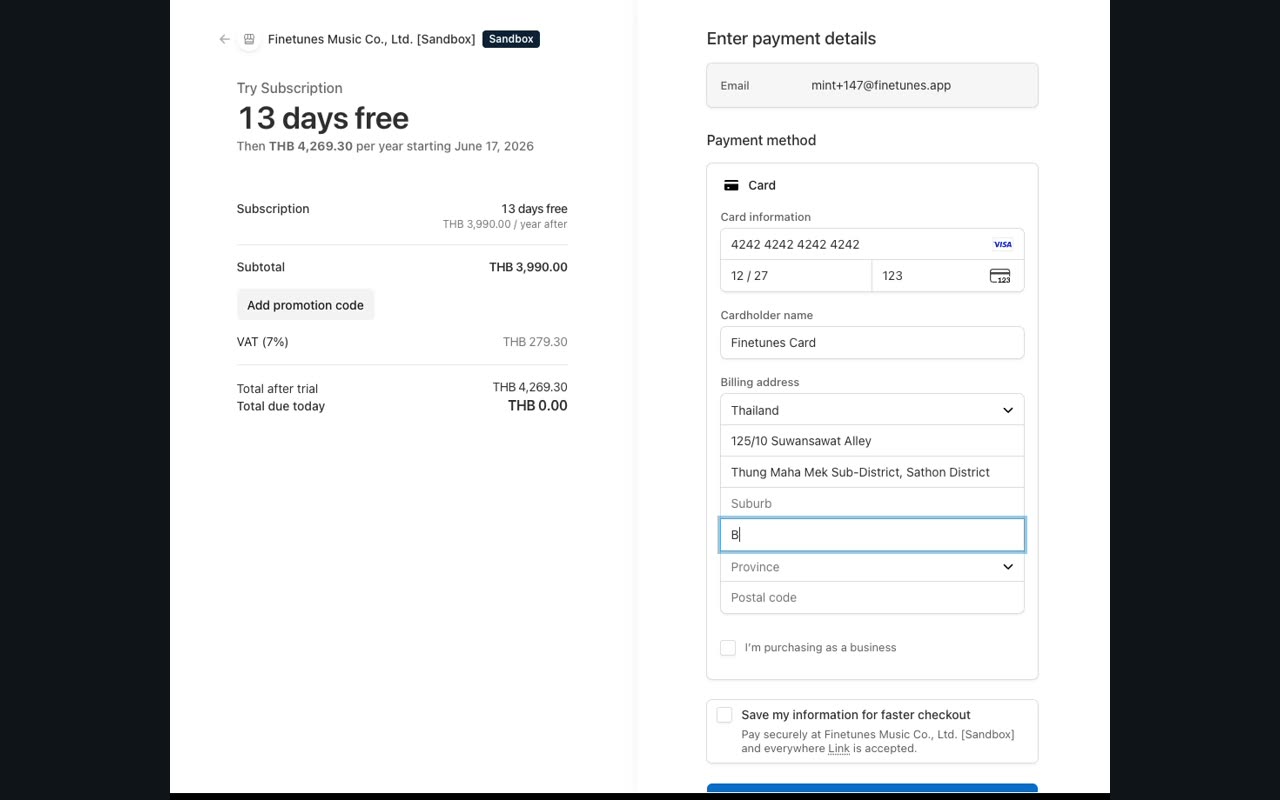
During the free trial, Total due today is THB 0.00 — your card is only charged when the trial ends. The plan price and VAT shown are what you'll pay on the first billing date.
Paying as a business (VAT / Tax ID)
If you need the invoice issued to your company, do this before you submit:
- Tick the "I'm purchasing as a business" checkbox.
- A VAT information section appears — enter your company / legal entity name.
- Choose your tax region (e.g. TH VAT for Thailand) and enter your Tax ID.
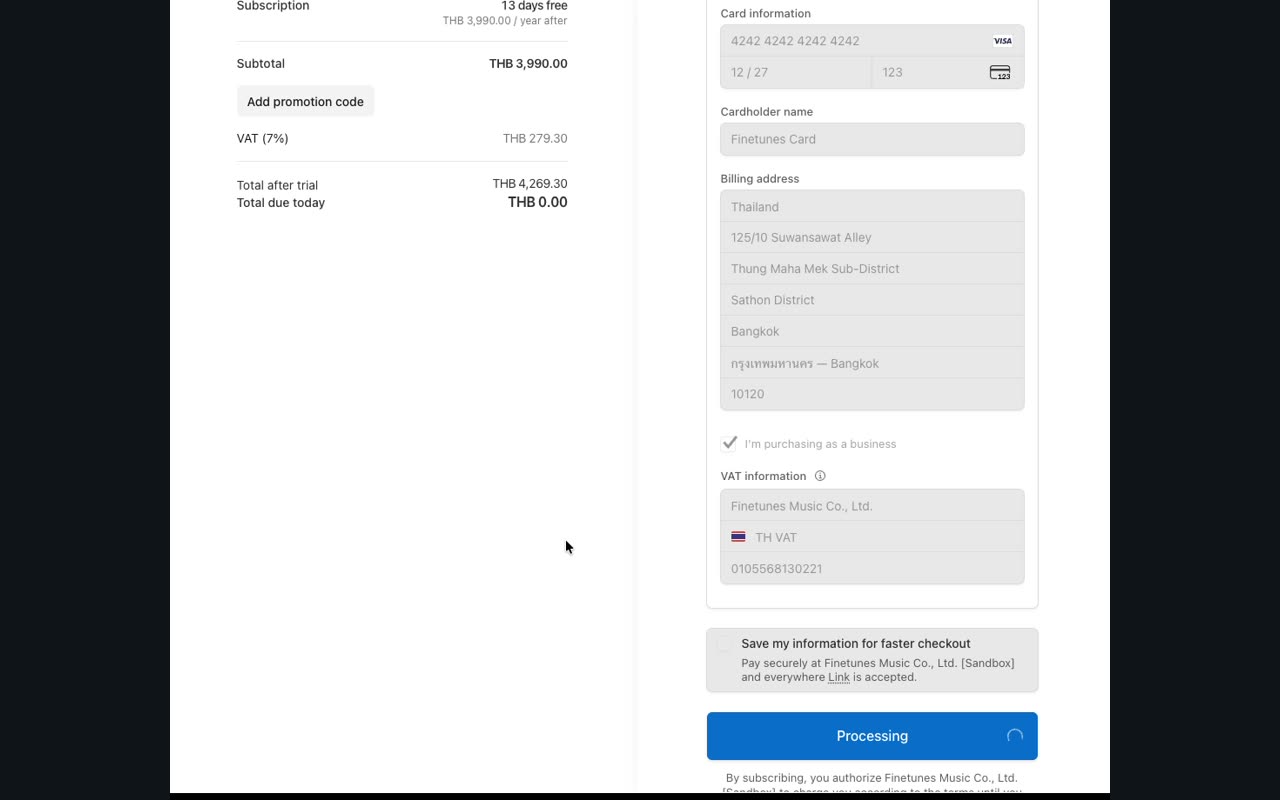
With the business box ticked, Stripe records your company name and Tax ID on the subscription, so your receipt and VAT invoice are issued to the company — what you need for expense claims and accounting — rather than to an individual.
3. Start the subscription
Click Start trial (or Subscribe). You're returned to your Profile, where Settings → Subscription now shows your active plan (e.g. Subscription – Yearly) with the next billing date.
Watch the checkout
Stripe secure checkout — enter card and billing, tick "I'm purchasing as a business", add company name & Tax ID, then Start trial.
FAQ
Can I pay by credit card as a business? Yes. Stripe accepts major credit/debit cards, and the "I'm purchasing as a business" option attaches your company name and Tax ID to the payment.
Will I get a VAT invoice with my company name? Yes — once you tick the business box and enter your company name and Tax ID, the invoice is issued to your company. You can download invoices later via Manage your subscription on your Profile.
I already started checkout as an individual — can I still add my Tax ID? Yes, as long as you haven't submitted. Tick "I'm purchasing as a business" before clicking Start trial and the VAT fields appear. If you've already subscribed, open Manage your subscription to update your billing details, or contact support.
Am I charged during the free trial? No. Total due today is THB 0.00. The first charge happens on the billing date shown at checkout.
Stuck at checkout, or need to change the company details on an existing subscription? Use Contact Support / Feedback on your Profile.