Pick for you
Tell finetunes what kind of venue you run, and it matches playlists to it — a Pick for You selection that lands at the top of your queue and plays first. You set this on your profile, under Business Details.
By the end you'll know:
- Where to enter your venue's type, category, and ambience
- How that turns into recommended playlists
- Where the recommendations show up
Naming the playpoint, setting its business type & category, saving — then the Pick for You playlists land at the top of the queue. (Recorded on a test account.)
"Pick for You" is the name of the result, not a page. You set your business details on your profile; the recommendation then appears inside your My Soundscape queue as playlists flagged Pick for You, queued first.
Open Business Details
Go to your profile at play.finetunes.app/profile (on mobile, reach it via My PlayPoint in the bottom tab bar). Find the Business Details panel and click the pencil to edit.
If your details are incomplete, finetunes reminds you with a "please fill business details" prompt — that's your cue to complete this.
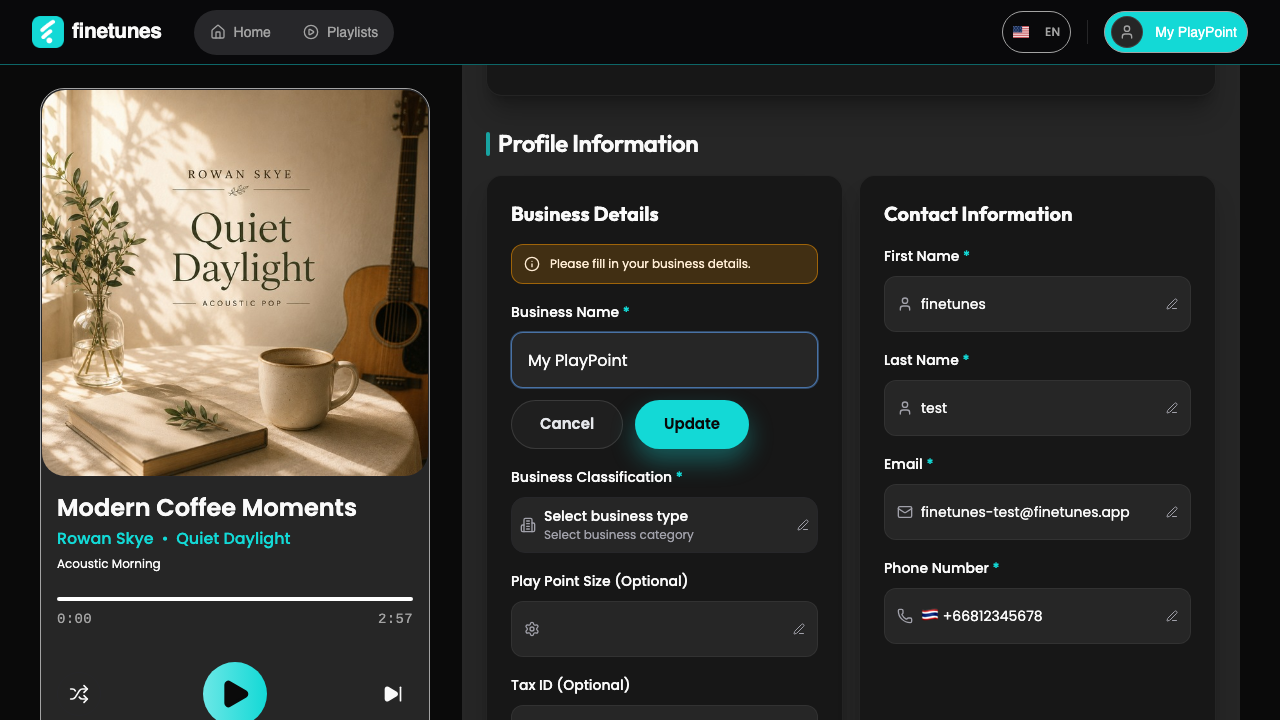 Set your venue's type, category, and ambience so finetunes can match music to it. (Shown on a test account.)
Set your venue
- Business Type (required) — pick what kind of venue you are.
- Business Category (required) — this unlocks once a type is chosen.
- Ambience — the mood you want. For cafés this is a set of checkboxes (pick several); for other venue types it's a single choice.
- Click Update.
Changing the business type resets the category and ambience — pick those again after switching type.
Your Pick for You is ready
When the update saves, finetunes re-matches music to your venue and shows a green toast reading "Your Pick for You playlist is ready!". The video above catches it.
Click View in queue to jump to your My Soundscape queue. The recommended playlists are flagged Pick for You and sit at the top of the queue, so they play first.
If the queue doesn't change
The match depends on your venue's category mapping to a set of recommended playlists. If nothing new appears:
- Double-check the type and category are the closest fit for your venue.
- Your queue falls back to its normal order if there's no specific match — that's expected, not an error.
- Still nothing? Contact support — the recommendation set for your category may need attention.
Next
- Reorder or manage what plays? Playlist queue →
- Play different music at different times? Schedule →
- Add more music yourself? Browse and search →